

Ask most people what condo management software does and they’ll describe the money side: dues, assessments, budgets, the annual statements a board signs off on. That picture leaves out the part of the building that’s busiest every single day. For a property manager or board member, the front desk is where packages pile up, guests arrive, contractors need letting in and residents bring their questions, and most of that work happens when nobody from management is in the lobby.
A condominium management system is software that keeps a building’s daily operations in one place: what the desk staff did and were told, who came in, what was delivered, what residents asked for and what they’ve booked. The accounting tools many platforms include are one part of the category. The front desk is another, and it’s the part residents feel.
This is how Reside CMS, the condominium management system we offer free to our staffing clients, handles that front desk work, grouped by who uses each part.
What a condominium management system is actually for
The front desk generates a constant stream of small events. A package arrives. A visitor asks for a resident. A plumber shows up for a unit on the ninth floor. A concierge notices the garage door isn’t closing properly. Each of these is minor on its own, but a building that handles a steady stream of them needs somewhere to record them that doesn’t depend on one person’s memory or a paper log behind the desk.
That’s the job. A condominium management system turns those events into records that the next shift, the property manager and the board can all see.
What the desk staff use on every shift
Shift logs
Every concierge records what happened on their shift: deliveries, visitors, incidents, anything the next person needs to know. When one shift hands over to the next, the log is the handover. It’s also how a desk that several people cover stays accountable from one shift to the next. We’ve written more about how front desks move from paper logs to dashboards.
Front desk instructions
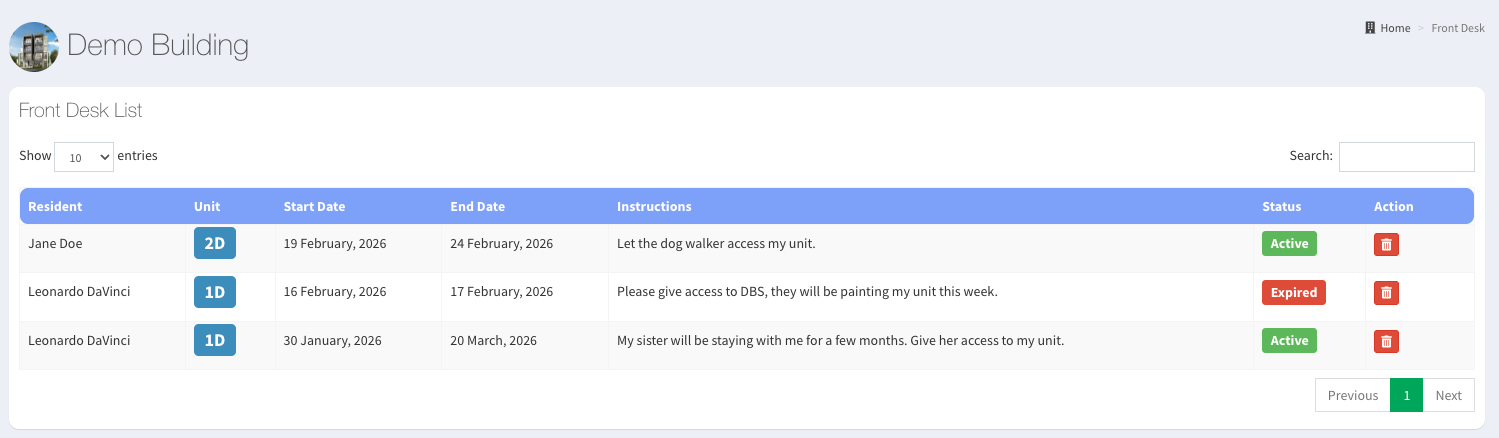
Every building has its own rules: which contractors are allowed in without an escort, where large deliveries go, how the party room gets handed over. Reside keeps these as customizable instructions at the desk, so a concierge covering an unfamiliar shift gives residents and visitors the same answer the regular concierge would.
Admit slips and the visitor log
When a guest arrives, the concierge can admit them with a digital admit slip instead of a handwritten entry. The visitor log records every entry. Together they give management a record of admissions and a history of visitor activity, which matters the first time someone asks, “Did anyone come to my unit on Tuesday?”
Package handling
Reside notifies a resident when a package arrives and tracks it until it’s collected, so the desk isn’t relying on residents remembering to check. The physical side of this, where packages are stored and who can hand them over, is its own topic; we cover it in how to keep package handling secure in a building.
Washington, DC
Weighing front desk staffing and software together?
Tell us about your building and we’ll explain how Reside CMS fits with our concierge staffing.
What residents use
A system that only the staff use still leaves residents calling or stopping by the desk for every request. These parts put the routine ones in residents’ own hands.
Maintenance requests
Residents submit a maintenance ticket and track it themselves. Property management sees the same ticket and can work through it, so a leaking faucet doesn’t depend on a note being passed from the desk to the office.
Amenity reservations
Pools, gyms and lounges get booked through the system rather than a paper calendar at the desk. Running every booking through one system is how Reside aims for fair access and organized scheduling.
Parking management
Residents can reserve and manage parking spots through Reside. For buildings with guest spaces or a limited number of spots, that takes a recurring source of friction off the desk.
Notice board
Announcements, updates and community events go on a digital notice board. A water shutoff or an elevator service window reaches residents without anyone taping paper to the mailroom wall.
Condo Trade
This one is unusual. Condo Trade is a built-in local classifieds board where residents can post items to sell or give away. The reasoning, as our Reside page puts it, is that many things get discarded that other residents might find useful.
What property management and the board get out of it
Most of the value for management isn’t a feature at all. It’s the records the features leave behind.
- Shift logs show what happened on every shift, including the ones nobody from management was there for.
- Admit slips and the visitor log give a record of admissions and visitor activity.
- Maintenance tickets show what residents asked for and where each request stands.
- Package records show what arrived and whether it was collected.
When a resident complains, a board asks a question at a meeting, or a manager takes over a building from someone else, those records are the difference between an answer and a guess.
Questions about Reside CMS or front desk coverage for your building? Call our office.
How Reside CMS fits with front desk staffing
Reside CMS is available free of charge to Washingtonian Concierge clients. There’s no separate charge for it on top of front desk staffing.
That changes the usual arrangement. A building that buys software from one company and staffing from another has two parties to coordinate: one company’s people working in another company’s system. With Reside, the software and the staff come from the same company. If your building is weighing front desk concierge staffing, the software question is part of the same decision.
You can see the full feature list on the Reside CMS page.
What a board should ask of any condominium management system
Whether or not you’re looking at Reside, these questions separate a system that will actually get used from one that won’t:
- Does it cover the front desk, or only the accounts? Shift logs, visitor records and package tracking are separate from dues and budgets.
- Who enters the information? A log only helps if the people on the desk fill it in on every shift. Ask how staff are trained on it.
- Can residents do the routine things themselves? Maintenance requests and amenity bookings that residents can submit directly take pressure off the desk.
- Can management see the history? The records matter most months later, when someone asks what happened.
- What happens at a handover? If the building changes staff, managers or companies, find out what happens to the records.
Frequently asked questions
What does a condominium management system do?
It keeps a building’s daily operations in one place: front desk records such as shift logs, visitor entries and package tracking, plus the resident side, such as maintenance requests and amenity bookings. Many platforms also include accounting tools for dues and budgets.
Who uses a condominium management system?
Three groups. Desk staff record shifts, visitors and packages. Residents submit maintenance requests, book amenities and read building notices. Property managers and the board use the records all of that leaves behind.
Does Reside CMS cost extra for Washingtonian Concierge clients?
No. Reside CMS is available free of charge to Washingtonian Concierge clients.
What should a board look for in a condominium management system?
Coverage of the front desk as well as the accounts, a clear answer on who enters the information, self-service for routine resident requests, and a history management can look back through.
Condo software is usually described in terms of the money side. The day-to-day work of a building happens at the front desk, and a condominium management system earns its place by recording that work shift after shift, in a way the next concierge, the manager and the board can all use. If you’d like to know how that would look in your building, we’re happy to talk it through.